Testing
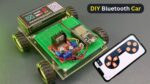
The testing stage ensures that all electronic connections, Bluetooth communication, motor control, and power components of the robot car are working correctly. Before testing, place the robot on a stable surface where the wheels can move freely and check that all wires are properly connected.
First, test the Bluetooth connection by pairing the smartphone with the HC-05 module. Open the Bluetooth-control app and send a simple command to confirm that the Arduino receives the signal. Next, test forward movement by pressing the Forward button and checking that both motors rotate in the correct direction.
After that, test backward movement and verify that both wheels rotate in the reverse direction. Test the left and right turning commands separately, ensuring that the robot changes direction smoothly and that the motors respond correctly to each command.
Finally, test the Stop command to confirm that both motors stop immediately when instructed. Check the battery and motor operation during the complete test to ensure that the battery provides sufficient power and that the motors do not become excessively hot. If the robot moves in the wrong direction, check the motor wiring or reverse the motor connections.